> ## Documentation Index
> Fetch the complete documentation index at: https://docs.altera.co/llms.txt
> Use this file to discover all available pages before exploring further.
# Altera OpenAPI Quickstart: keys, auth, first invoice
> Generate an API key, authenticate requests, and create your first invoice with the Altera OpenAPI. Step-by-step guide for sales and expense endpoints.
## How to begin
In order to start using the Altera OpenApi endpoints you need to first configure an openApi key within your company settings in the application. To do so head to Settings, then select Integration section. You will be provided with an option to generate a new key. Once you have the key, you can start using the endpoints.
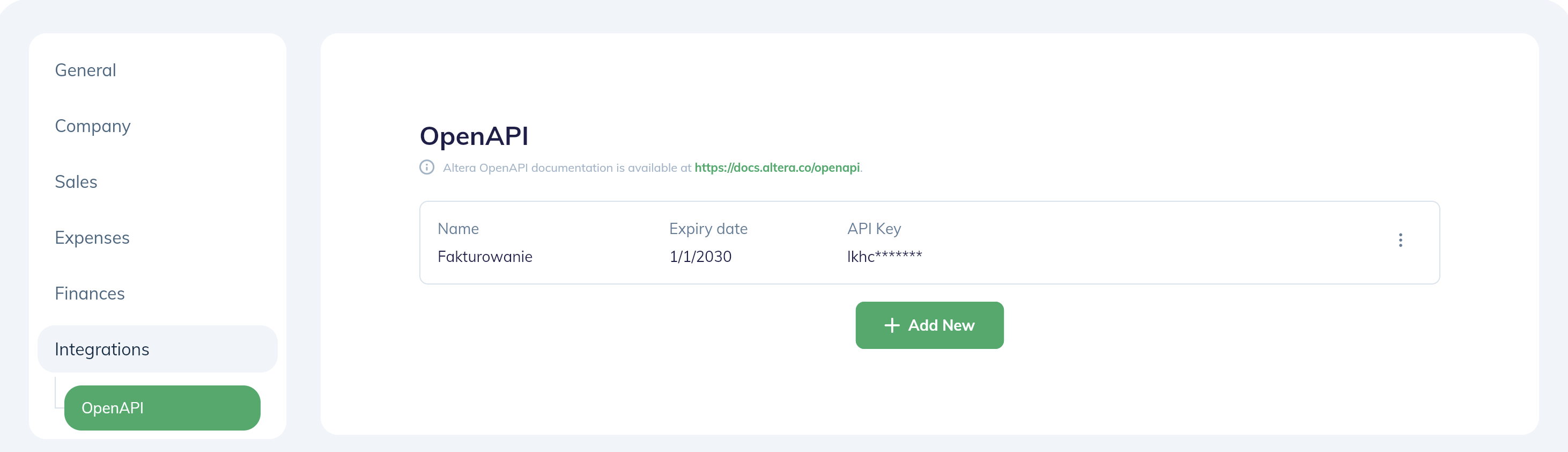 Each key generated in the application is unique and should be kept secure. If you suspect that the key has been compromised, you can always reject the previous one and generate one that is brand new.
## Authentication
All endpoints require authentication with the API key generated in the previous step. The API key must be included in the headers of each request in the form:
```
"Authorization": {API_KEY}
```
Each key authorizes the user to perform actions within the company it was generated for. If you wish to perform actions in multiple companies, you need to generate a separate key for each of them.
## Base URL
The base URL for all endpoints is: [https://api.altera.co/](https://api.altera.co/)
## Try it out
### Creating a new invoice
In most cases this will be the basic use-case for an integration - creating a new invoice based on data provided by external CMS system.
Such operations can be achieved by calling a single endpoint: [POST /sales/invoice](/openapi/sales/createupdate-invoice) with `basicInformation > statusId` set to `ISSUED`
### Things to keep in mind
If you wish to use additional features of the Altera system, such as detailed financial dashboards, it is imperative to assign `projectId` to your invoice and `productCategory` to your products in the `invoicePosition` array.
This way the system will be able to properly aggregate your sales based on above-mentioned factors.
It is possible to manage both product categories assigned to an invoice as well as projects post-creation, using regular Altera interface so if you wish to just start generating invoices fast, there's nothing blocking you from it.
## So I've issued an invoice. What can I do next?
### Downloading the source file
Using [POST /sales/pdfUrl](/openapi/sales/generate-pdf-url) endpoint you can retrieve a pre-signed url that gives you access to the file for 10 minutes
### Sending my invoice to recipient
Using [POST /sales/invoice/send](/openapi/sales/send-invoice-email-to-contractor) endpoint you can order an e-mail to be sent to your contractor using either the data saved in the system (Contractor info saved along with the invoice) or using an e-mail address of your choice directly.
In order to use this function certain configuration steps need to be followed within the application prior to sending out the email - you can learn more within the endpoint's definition.
Each key generated in the application is unique and should be kept secure. If you suspect that the key has been compromised, you can always reject the previous one and generate one that is brand new.
## Authentication
All endpoints require authentication with the API key generated in the previous step. The API key must be included in the headers of each request in the form:
```
"Authorization": {API_KEY}
```
Each key authorizes the user to perform actions within the company it was generated for. If you wish to perform actions in multiple companies, you need to generate a separate key for each of them.
## Base URL
The base URL for all endpoints is: [https://api.altera.co/](https://api.altera.co/)
## Try it out
### Creating a new invoice
In most cases this will be the basic use-case for an integration - creating a new invoice based on data provided by external CMS system.
Such operations can be achieved by calling a single endpoint: [POST /sales/invoice](/openapi/sales/createupdate-invoice) with `basicInformation > statusId` set to `ISSUED`
### Things to keep in mind
If you wish to use additional features of the Altera system, such as detailed financial dashboards, it is imperative to assign `projectId` to your invoice and `productCategory` to your products in the `invoicePosition` array.
This way the system will be able to properly aggregate your sales based on above-mentioned factors.
It is possible to manage both product categories assigned to an invoice as well as projects post-creation, using regular Altera interface so if you wish to just start generating invoices fast, there's nothing blocking you from it.
## So I've issued an invoice. What can I do next?
### Downloading the source file
Using [POST /sales/pdfUrl](/openapi/sales/generate-pdf-url) endpoint you can retrieve a pre-signed url that gives you access to the file for 10 minutes
### Sending my invoice to recipient
Using [POST /sales/invoice/send](/openapi/sales/send-invoice-email-to-contractor) endpoint you can order an e-mail to be sent to your contractor using either the data saved in the system (Contractor info saved along with the invoice) or using an e-mail address of your choice directly.
In order to use this function certain configuration steps need to be followed within the application prior to sending out the email - you can learn more within the endpoint's definition.